

In this Insight, I will walk you through SEVEN SIGNS that your SaaS needs attention…
If you ignore these signs, you gonna face an expensive surprise.
I’ve seen them first-hand from 3 different perspectives:
-
From a senior developer role – creating SaaS products
-
From a CTO role – where I saw how all these issues affect the business and its outcomes
-
From SaaS transformation expert role – transforming the whole development operations of a SaaS company (processes, workflows, security, guardrails, etc.) – to cut costs and speed up development using AI.
Here they are.
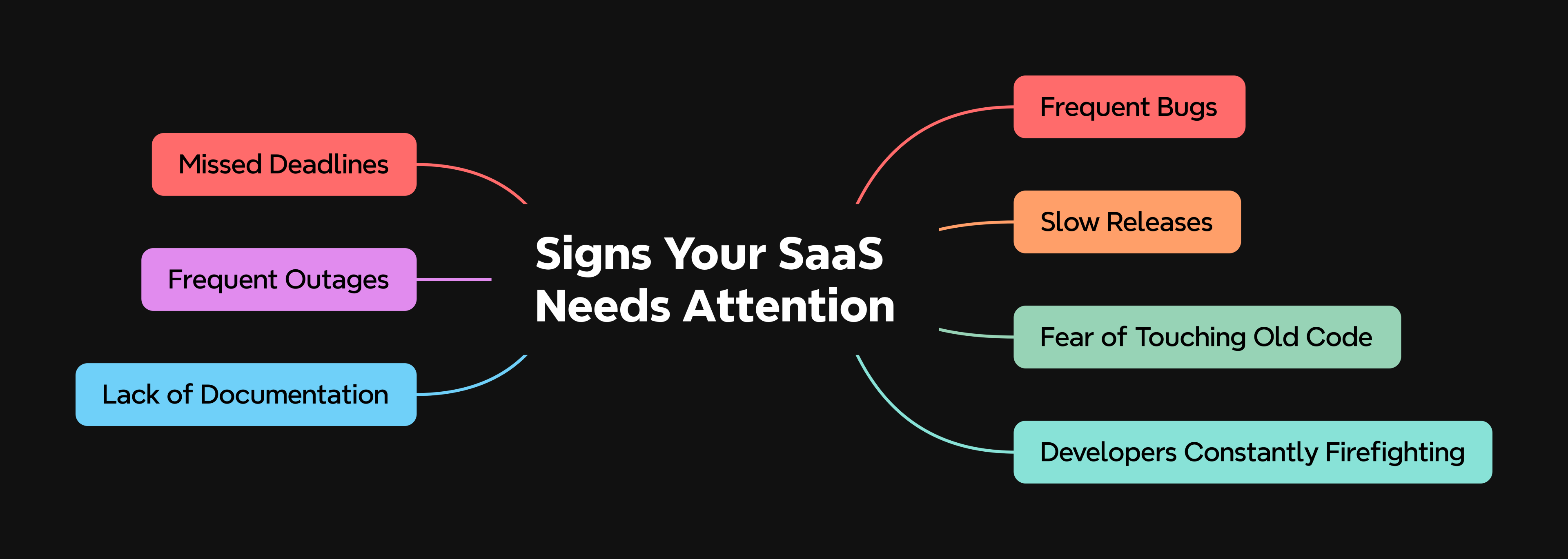
Frequent Bugs
One of the most obvious signs for me that something is wrong in a SaaS company is having frequent bugs.
Now don’t get me wrong…
All SaaS companies have bugs here and there…
The difference is this.
The BIGGEST problem is when the bugs actually get released and your clients find out.
This DIRECTLY affects how your clients PERCEIVE your RELIABILITY.
If they have to deal with bugs, pick up the phone and call you up – or submit a support ticket and then wait for god-knows-how-many-days – this can quickly become very POOR CUSTOMER EXPERIENCE.
I always say that any business owner should protect the customer experience at all costs because if you mess up too many times slightly – or even just once massively – customers start to churn and your reputation will take a hit.
This is ESPECIALLY critical in medium to high-tier B2B with lower volume but higher MRR per client – where every cancellation is a SIGNIFICANT portion of the total MRR.
One of my clients had this incident where they had a bug that caused notifications to be sent to all their client’s customers (consumers)…
These were messages that should only go out to a small set of these customers – not to all of them…
Instead, it went out to the full list creating a pretty massive reputational damage.
The client was a bigger investment group owning multiple companies and got this SaaS set up in their FIRST company, just to test it out.
Because of this bug, they were so angry they said: “We wanted to get this to all of our 16 companies. Now we see clearly we can’t rely on this… and we decided to use a different solution.”
These 16 companies together were €3M lifetime client value.
Gone – because of one bug.
If you have frequent client complaints because your team releases bugged code – that’s a RED FLAG.
Slow Releases (Development Taking Too Long)
When you see that development is taking forever, there can be multiple issues – many times a combination of them:
Unclear Tasks
If the task your developer gets from you is not clear, you can be sure the development will take MUCH LONGER than needed.
The issue here is that the moment they pick that “ticket” (task) from JIRA (the project management app) that does not have a clear description of what to do, they will spend HOURS wondering how it was actually meant.
At the beginning, your developers might actually reach out to you for explanation, and you will have to give them more details, so they actually understand what is expected from them.
Over time, this gets worse…
Most of the time they will write you on Slack asking for details…
Now you’re in a meeting or strategizing next steps, so you can’t respond immediately.
In a few months, this will have TRAINED THEM to stop asking for details and try to figure out on their own – because it’s faster than waiting for your reply.
This will result in them actually creating the feature, but with THEIR OWN ASSUMPTIONS about what should have been created.
So they give you the final feature and you realise it’s not actually what you wanted.
Now they have to redo it, meaning the REQUESTED feature will take even longer.
All of this because of unclear task descriptions.
Missing Tools
This one is big and I’ve seen them in MOST SaaS businesses.
Imagine this:
Your client reports a bug.
The bug gets written into your JIRA (a.k.a. project management / ticketing app) waiting for one of your developers to pick it up and fix the bug.
Now Hans, your senior developer, picks the ticket and half a day later, he realises that he cannot REPRODUCE the bug on this office computer.
Why?
Because in the live application, where the bug happened, there was some EXACT data, and that EXACT COMBINATION resulted in this bug.
So he spends the rest of the day trying to reproduce the bug on his machine.
No luck.
The next day he wants to get the data from the live application into his local machine, so that he can finally see the bug there…
Now there are three scenarios.
The First Scenario
FIRST is that he and everybody else has the keys to your live application and can open it up and get the data…
This one super dangerous (read THREE RED FLAGS!) and it’s just a matter of time until somebody messes up and either destroys or corrupts client’s data… or breaks the whole application, so that it will need serious recovery – that mostly takes several hours…
I had to deal with these rescue operations many times over… it’s absolutely important to avoid them.
The worst thing is, they can happen at the worst possible moment – think you’re 3 minutes away from demoing your system to a brand new prospect.
You open the app to show them the benefits – and read FATAL ERROR on the screen… the new B2B prospect is nervously waiting, while you’re sweating, feeling like an incompetent fool…
You nervously say: “It seems our guys are making some updates right now.”… and hope the prospect doesn’t ask questions in his mind like “Is their service always like this?”
The Second Scenario
The SECOND scenario is that Hans DOES NOT have the keys and must WAIT for the one key person who has them.
Again… your developer needs to WAIT in order to finish the work…
And no… switching to other task in the “meantime” is not an effective solution to this problem.
The Third Scenario
The third scenario is that there is a tool or some mechanism thanks to which he can get the data, while staying away from the live application – so that the customer’s data and your application is protected from accidents…
This is the fastest and most secure option to go forward – yet – your team needs to have these tools and processes created in advance to be able to work this way and stay protected…
Missing Documentation, Links or Information
Another bottleneck resulting in slow releases is that your developers are missing some information to finish the job.
Here’s how it works.
They pick the ticket (task from your project management app – remember?), read the description, and they go: “Oh shit, where do I find the documentation, so that I can connect to the elevator system?”
If they LACK any critical information to move forward, they will ask you for the missing information…
Many times, this will take HOURS or DAYS to get the things they need – because you might need to contact the vendor… and some old-school vendors are insanely slow (read DAYS TO WEEKS).
In the meantime, they will try to do what they can, sometimes just waiting and tidying things up a little bit…
Work Assignment Chaos
If you tell your developer to do a new feature, and he can’t find the ticket / the description of what to do… this is gonna be a time waster like hell…
In many SaaS companies I’ve looked into, they spread their tickets between JIRA (the project management app), Slack, email, calls, or just telling what to do “quickly” during a Monday standup.
In such chaos, your developers have to literally “chase” the ticket through multiple channels wondering “Where the hell they posted this feature description again?! Weren’t they supposed to put all tasks into JIRA?”
Poor Developer Efficiency
If you’re paying your developers by the hour or a fixed rate for a full time / part time contract…
…their incentive is TO SPEND TIME.
That doesn’t mean to PRODUCE effectively during that time. It just means to have the clock ticking.
If you cannot hold your developers accountable, you can be sure that some of them – especially in larger teams – won’t work effectively.
I don’t wanna sound “negative” here – I’ve encountered this in MANY dev teams – so I want you to know this to gain AWARENESS.
Since you are a non-tech founder, it is easy for them to “explain” their way to you like:
-
“It’s been more complicated that I thought.” – You can’t verify this and they might be right
-
“I also had to do these 3 other things in order to finish this up.” – Again you can’t verify, he may be right.
Horror Codebase
I want you to know about this scenario…
When your application gets to a state where the code is SUCH A MESS, that your developers can’t really get through it nor understand it…
…and even their AI cannot do a good job at that…
You have a “horror codebase”…
It means the way the code is structured inside is so bad, that your team just CANNOT create new features, nor fix existing features FAST…
Because every single thing they want to change affects many other things – and it becomes a nightmare.
They change thing A, that breaks thing B… so they try to fix thing B, which breaks thing C…
This is a massive RED FLAG.
Failed Onboarding
If you have a new hire, let’s say a new developer, and it takes them forever to release anything, one of the first things I investigate, is the onboarding process…
Here’s the thing…
If your new hire is missing some information, tools or access keys… sometimes he doesn’t want to look stupid, so he tries to go around the issue somehow in a different way…
Which takes time… and produces NOTHING.
This needs attention and if I’m right on this, your onboarding process needs to be changed for sure.
Wrong Hire
If you have a new hire, he was correctly on-boarded, has all the things required, even a senior mentor and he’s 4 weeks in and still can’t really produce anything meaningful…
You might have hired a junior that looked like a senior on CV.
I’ve seen these cases many times over – they are VERY COMMON, and after all these years, can spot these cases pretty quickly.
This may be a PROCESS problem – where it’s your responsibility as the founder to make sure new hires have all the tools, information and mentoring needed for fast onboarding…
…or it can also be a particular hire problem – that you hired somebody who can only replace a light bulb, but is put into a role where designing complex electronics is required.
There are some more possible issues, but I don’t want to go too deep into this topic in this post.
Let’s move on to the next red flag.
Fear of Touching Old Code
Another big RED FLAG is when you need your developers to change or extend some part of a system and they are VERY RELUCTANT to touch it at all.
“Can’t Jack do this instead? He’s more skilled in this area!”
“I haven’t coded this part, so why should I be the one extending it? I think Jack should do that!”
“I’m not gonna touch that part, because it can all fall apart.”
“There is some legacy code there and I don’t know how it works.”
These ^^^ are the phrases that can be a signal that you have some nasty problematic part in your SaaS application.
Why is this a red flag?
Extending it = risk of breaking the app = clients not being able to use your app.
Cleaning it up = risk of messing it up = something that worked before will suddenly stop working.
It means that even touching that part of the system can break it.
In many cases, I advised the founder to have this cleaned up properly – depends on the case and business context as well though.
Developers Constantly Firefighting
If every week you have some “emergency” on your table, that is a massive RED FLAG to be dealt with for sure.
It goes like this.
Your team releases a new feature.
That feature gets to your clients.
The feature doesn’t work or something else has broken down.
Either way – the client is unhappy he cannot use the app.
You scramble your team to fix that ASAP.
Here’s what happens…
They are in the middle of work, creating a new feature or fixing a bug.
Now they have to interrupt this, forget about it, and switch to a completely new “URGENT” bug that needs to be fixed. ASAP.
This context switching alone is a MASSIVE COST and can burn out your team if you don’t take this under control.
So they fix the bug, release a fix for it in a RUSH… and pray it gets fixed… because it was rushed.
Fortunately this time it did work. The last time it did NOT.
The “fix” broke three other things that also created THREE NEW EMERGENCIES.
Point is this.
Emergencies can easily create a few more emergencies, so it’s best to avoid them completely.
Two weeks later. Another emergency.
The real issue?
The PROCESS.
Again, most of the time it’s NOT about an INDIVIDUAL developer.
And even if it was my question would be this:
“Is there a solid process that avoids these emergencies?”
“Has this developer been properly trained and instructed to follow the process?”
“Did he truly follow the process?”
In most SaaS companies, the answer is “There IS NO PROCESS at all.”
Lack of Documentation
Timewaster like nothing else.
I touches a little bit the “Slow Releases” part above.
There are TWO parts to this.
One is your company’s internal “Wiki” or “Knowledge Base” for your team.
The other documentation is INSIDE the CODE.
If your business doesn’t have such company-wide documentation (a.k.a Knowledge Base) – massive RED FLAG.
If your developers create code that doesn’t have documentation inside – another RED FLAG.
Why is that?
Without a KB (knowledge base), you rely on individual PEOPLE knowing how to do stuff.
That person leaves, breaks her legs when skiing in Swiss Alps… and your business is BLOCKED.
The other problem is bad as well.
AI reads the code and also reads the “comments” or “documentation” inside the code to understand what is going on.
Your developers will have NO CLUE what different parts of your system actually do without that documentation.
There is this developer culture that says: “If you’re a great developer, you don’t need any documentation. You can immediately know just from looking at the code.”
It’s total bullshit.
I’ve been in this for 24 years now and many things are SO COMPLEX, that even I have NO CLUE what is going on UNLESS I SPEND TIME figuring it out, testing it out, playing with the code, etc.
The point of the documentation is that NOBODY in your team MUST SPEND time to understand what it does.
If your developers need to “decipher” each other’s code because there are no “explanations” in their code = RED FLAG no matter individual developer’s opinions.
Frequent Outages
Bad one.
Every outage means that your clients will have a service disruption.
If you’re under an SLA contract (service-level agreement), you might also have PENALTIES section there and be obliged to pay a penalty for breach of your service.
This is not that case for B2C.
But we’re talking B2B right?
Some B2B systems are actually a CRITICAL infrastructure for your clients.
If they go down, their whole BUSINESS might be blocked – causing them massive LOSSES.
I’ve spent years directly managing SaaS and the servers they run on to make sure OUTAGES are minimized.
One of my clients was running a B2B SaaS solution for restaurants.
This system was critical for them. If the system went down, their customers literally couldn’t access the “online menu”…
And some of these clients decided to get rid of their “paper menus” – because they had the better “online version” – so what could go wrong?
At one point in time, they had like a 5-hour outage… with 80 restaurants waiting to show the menu to their customers.
If you have FREQUENT outages – and especially client complaints – this is a RED FLAG and must be addresses sooner rather than later.
Missed Deadlines
There can be TWO issues here.
The first one is BAD ESTIMATES for work.
This is very tricky thing in the software industry. Estimating how long a new feature can take is hit or miss if you’re estimating SHORT TIMEFRAMES.
Like if I asked your developer team to estimate how many HOURS a task would take…
They would go like “Ahm… 2 hours…” The possible error here IS MASSIVE.
If there’s any deeper issue there they didn’t see before, it can become SEVERAL TIMES MORE.
If I asked them how many DAYS…
It’s much easier to estimate whether it fits within a day or two.
Yet again, if there’s any issue, it can become more.
If I asked them if it’s within a WEEK…
It’s even easier to estimate.
So the HOURLY estimate has a MASSIVE ERROR rate.
One skeleton in the wardrobe somewhere deep in the code and they’ll shoot through the deadline.
That’s why some methodologies stopped estimating hours and started to estimate “complexity” like “Give me a number from 1 to 10 how hard it will be to finish this.”
The other issue here is CONSTANT INTERRUPTION of work, so that even if the estimate was pretty much solid…
…it will be IMPOSSIBLE for your team to meet the deadline, because you ordered them to STOP and FOCUS ASAP on an URGENT bugfix or a URGENT feature that a client just demanded.
This kind of interruption raises the COST per FEATURE through the roof because the team needs to “switch context” to something else.
I’ve seen this from all THREE layers – the developer having to switch, the CTO seeing the team switch, the business-level transformation expert designing SaaS processes that mitigate this issue as much as possible.
If the issue is just bad estimates, that’s NOT really a red flag unless the track record shows it’s been very off for quite some time.
If it’s the constant INTERRUPTION of work, processes need to be updated and these interruptions minimized as much as possible.
2-Week Deep Discovery Program
How many of these signs do you recognize in your company?
If you think now you might get an “expensive check” from your SaaS platform, we do a 2-Week Deep Discovery Program.
In this program, we review your SaaS business and tell you exactly what is OK, what can wait, and what is a risk that needs to be addressed immediately, to avoid expensive surprises one week before due diligence or right at key prospect’s demonstration meeting.
Book a free introduction call here to see if our 2-Week Deep Discovery is a fit you.